
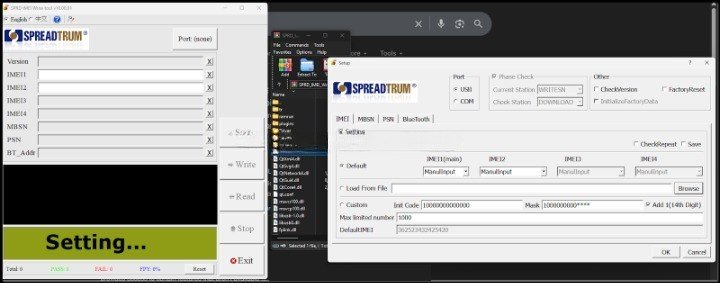
SPRD IMEI Write Tool v10.00.01 Free Download (Latest Version)
If you work with Spreadtrum (SPRD) devices, you already know how annoying IMEI repair can get when tools crash or refuse to detect your phone. The SPRD IMEI Write Tool v10.00.01 tries to fix that mess with better stability, improved detection, and support for newer models.
This latest version is now available free for all users, which is probably the only universally good news in tech this week.
What is SPRD IMEI Write Tool?
SPRD IMEI Write Tool is a utility designed to write or repair IMEI numbers on Spreadtrum-powered smartphones. It’s commonly used by mobile technicians to restore IMEI after software issues, flashing errors, or firmware corruption.
What’s New in Version 10.00.01
This update isn’t revolutionary, but at least it fixes things that should’ve worked properly in the first place:
- Updated Device Support
Improved compatibility with newer Spreadtrum models. - Improved Stability
Reduced random crashes during the IMEI writing process. - Better Driver Detection
More reliable phone detection in USB mode. - UI Improvements
Cleaner and smoother interface, so you don’t feel like you’re using Windows XP in 2026.
Key Features
- Supports single and dual IMEI writing
- Works in USB mode
- Lightweight and easy to use
- Free for all users
- Compatible with most Spreadtrum devices
How to Use SPRD IMEI Write Tool v10.00.01
Follow these steps carefully unless you enjoy staring at error messages:
- Download the tool and extract the ZIP/RAR file
- Install Spreadtrum USB drivers on your computer
- Open the folder and run WriteIMEI.exe as Administrator
- Click on the Setup button
- Select USB mode
- Choose IMEI type (1 or 2)
- Click OK to save settings
- Enter your IMEI numbers in IMEI1 and IMEI2 fields
- Power off your phone completely
- Connect the phone via USB (use boot key if required)
- Wait for the tool to detect your device
- Click Write
- Wait for the PASS message
- Disconnect and reboot your phone
Important Notes
- Always use valid and legal IMEI numbers
- Make sure drivers are properly installed before starting
- Use a good USB cable, not the one that came free with something questionable
Download SPRD IMEI Write Tool v10.00.01
You can download the latest version here:
https://www.gsmxcode.com/downloads/file/?id=fe2895cd0dd935f252ebc3a2d7dfce7b84e2ea11
